
Customer Help – Sound Nexa Karaoke Support
Welcome to Sound Nexa Customer Help Center.
We are here to assist singers, musicians, DJs, live performers, and karaoke lovers with all karaoke track related support.
Whether you purchased Audio Karaoke, Video Karaoke, Instrumental Tracks, or Karaoke Packs — this page will help you with downloading, extracting, using, and troubleshooting your files.
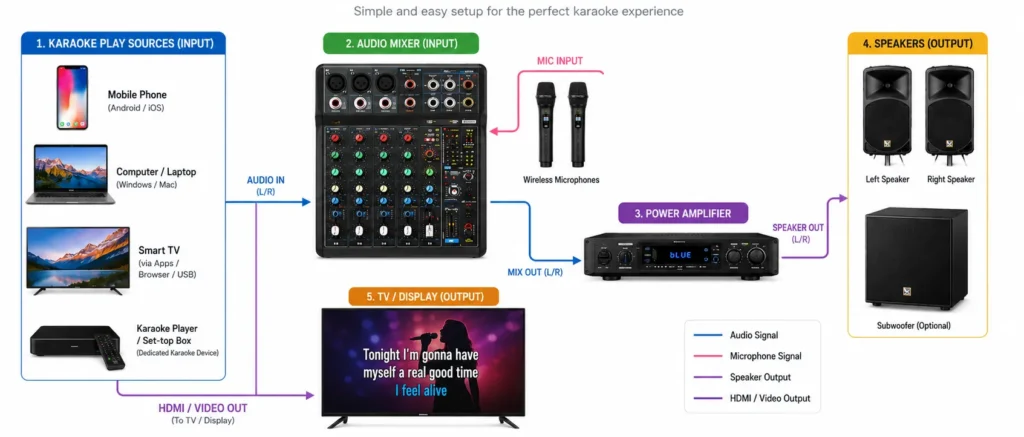
Using Your Karaoke Tracks
Your files are ready. Here is the equipment you need and how to connect it, whether you sing at home or on a live.
What you need
Our MP3 and MP4 files play on almost any device. Pick the kit that matches how you like to sing.
Portable speaker with mic
All in one. Easy to carry and quick to set up.
- Phone or laptopTo play your MP3 or MP4 file.
- Portable karaoke speaker with mic inputAny karaoke speaker works, or choose the JBL PartyBox series.
- MicrophoneWired or wireless. Check if one comes with your speaker.
Best for home practice, small gatherings and singing anywhere.
Professional setup
Full control and a bigger sound for shows, events and video karaoke.
- Professional microphoneWired or wireless. A dynamic mic suits live singing.
- Audio mixerSets music and voice separately and adds echo or reverb.
- Speaker or amplifierActive speakers, or a power amplifier with passive speakers.
- Cables and adapters3.5mm, RCA, 6.35mm or XLR for audio. HDMI for video.
- HeadphonesFor monitoring the track and quiet practice.
- Screen for video karaokeSmart TV, LED screen or projector to show the lyrics from your MP4.
You also need a phone or laptop to play the file.
Make the track fit your voice
If a track feels too high, too low or too fast, we can adjust it for you.
Custom scale or tempo
We change the key or speed so the song suits your range.
Male / Female with voice track
A guide vocal helps you learn the melody before you sing alone.
Need help with your setup?
Tell us what equipment you have and we will suggest the right connections.